1. Log into SFL Accred
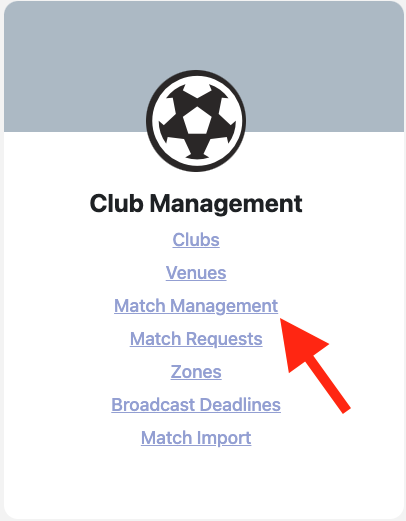
2. Select Match Management
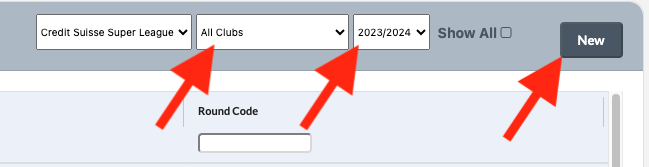
3. Select the Home Team of the new match from the dropdown, ensure the year is correct and then click New
4. On the right select the new match information
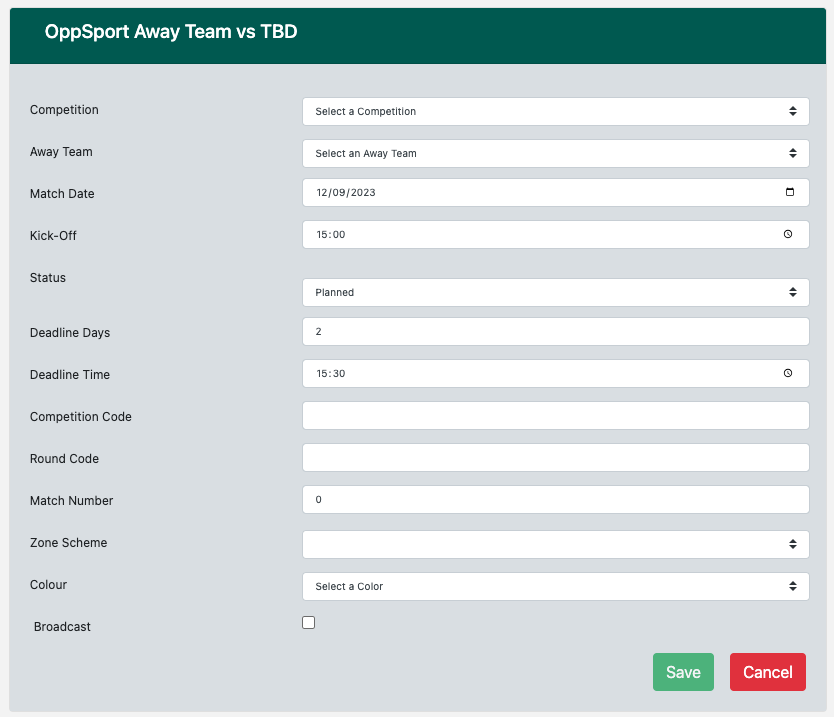
Competition: Select what League the match is in
Away Team: Choose the Away Team
Match Date: Choose the Date of the match
Kick-Off: Choose the Kick-Off time
Status: All statuses other that Available are not bookable. Choose available if you would like organisaions to be able to book the new match, else set the appropriate status.
Deadline Days: Choose the days before the match that the Media can book up until (this is defaulted to the Home Teams default media deadline)
Deadline Time: Choose the time on the deadline date that the Media can book up until (this is defaulted to the Home Teams default media deadline time)
Competition Code: Optional
Round Code: Optional
Match Number: Optional
Zone Scheme: Ensure Broadcast/Media 23/24
Colour: Optional, this is the boarder colour on the passes
Broadcast: Ensure this is checked if you would like Broadcaster to be able to book onto the match
5. Once completed click Save
That's it the match has now been added to SFL Accred